
Capabilities
Everything the platform actually does
You mark out placements on your own site. Advertisers register in your branded portal, fund an account, build a campaign and upload creative. You approve what runs. This page is the working list, and things still in development are not on it.
Your inventory
Placements you define
Mark out a slot on your own site, give it a size and a price, and drop the tag in. That placement is then something an advertiser can bid on without talking to you first.
A floor price per slot
Each placement carries its own minimum. Nothing serves below it, so the cheapest campaign in the system still cannot undercut the number you set.
Every country priced from that one number
The floor you type is your price for a thousand views from the United States. Every other country is priced as a share of it, across a table of 198, so a buyer in a cheaper market pays the cheaper rate without you pricing the world by hand. Clearing your floor stays a single yes or no, the same in every country.
Delivery in proportion to bid
Campaigns bidding at or above your floor share the slot in proportion to what they bid, so a higher bid buys a bigger share of delivery rather than shutting everyone else out. That is the behaviour as at 16 September 2026.
A house ad as the floor
Set your own promo as the fallback so an unsold slot shows something of yours instead of blank space.
Domain records and verification
A zone records the first domain it serves on, and you can separately verify a domain you own with a meta tag or an uploaded file. Both give you a record of where your tags are running. Neither blocks a tag from serving somewhere else, so watch your reports if that matters to you.
Prebid.js endpoint
Your zones expose a bidding endpoint that a Prebid.js wrapper can call, so direct demand can compete inside a header bidding setup you already run.
What advertisers can target
Device, down to the handset
Desktop, mobile or tablet, then narrowed by brand and by specific model. A campaign can run on Samsung tablets and nothing else, or on named iPhone models only.
Browser and operating system
Twenty browsers and the operating systems behind them, so a campaign can chase a technical audience or avoid one.
Location, four levels deep
Continent, country, region or city. Sell a city-level placement to a local business without building anything.
Language
Match the reader's language rather than assuming it from geography.
Day and hour, in their timezone
A weekly schedule down to the hour, evaluated in the advertiser's own timezone rather than yours. A campaign set to run at 9am runs at their 9am.
ISP and mobile carrier
Networks are resolved from the visitor's address and listed by country, so a campaign can be pointed at a specific ISP or a specific mobile carrier, or told to avoid one.
Contextual keywords
Your tag can pass the page's keywords on the ad request. Campaigns carrying a matching keyword are weighted heavily for that slot, so a review of a mining rig pulls the mining rig advertiser rather than whatever was next in line.
Domain filtering
Include or exclude specific domains, so an advertiser can avoid pages they do not want to appear beside.
Category rules
Placements carry allowed categories, so an advertiser in a category you have not approved for a slot simply never enters the auction for it.
Campaign controls
Frequency capping
Cap how many times one person sees the same ad in 24 hours, so a campaign does not burn its budget on the same handful of readers.
Total and daily budgets
A campaign stops at its ceiling. Daily pacing keeps a month of spend from disappearing in an afternoon.
Campaign cloning
Duplicate a campaign with its targeting and settings intact. Repeat buyers become a two minute job instead of a rebuild.
Creative approval
Uploaded creative sits pending until you approve or decline it. Nothing an advertiser uploads reaches your site without you seeing it.
Measurement and billing
Billing on viewable impressions
An impression only becomes billable once the ad has held 50 percent of its area on screen for more than 300 unbroken milliseconds. Ads that are never scrolled to are never charged for.
Traffic filtering on the event path
Bot and crawler detection, duplicate click suppression, click timing validation and repeat click rate limiting, applied before anything counts toward reporting or spend.
Conversion tracking with value
A pixel on a post-action page reports conversions back and can carry a transaction value, so an advertiser sees return rather than just traffic.
Reporting on the same event stream
Impressions, clicks and conversions land in one analytics store, so what the advertiser sees and what you bill come from the same rows.
Getting paid
Card payment in your portal
Connect Stripe and advertisers top up their balance by card without leaving your branded portal.
Vouchers for everything else
Take payment by transfer, invoice, crypto or cash and issue credit directly. No merchant account, and no processor deciding whether your industry is acceptable.
Balances, not invoices
An advertiser holds a balance and spends it down across campaigns. Money moves to you as impressions settle rather than in a chase at the end of the month.
Access and security
Two factor sign-in
Any account can turn on Google Authenticator and be asked for a code at sign-in. It protects getting into the account, not individual actions once you are inside.
Your advertisers, your tenancy
Advertiser accounts belong to your portal. They sign up with you, they see your brand, and they are not shared into anyone else's marketplace.
Who wins the slot
You set a floor on the placement. Campaigns bidding at or above it split the delivery in proportion to what they bid, so a higher bid buys a bigger share of the slot rather than locking everyone else out of it.
Common questions
Is anything here an add-on?
No. Targeting, viewable billing, frequency capping, approval, vouchers and the rest are the platform. Plans differ on how much traffic you serve and how far the branding goes, not on which features you are allowed to use. Several competitors charge separately for targeting and for white labelling, which is worth checking when you compare a base price against ours.
What is deliberately not on this list?
Anything still in development, and anything that belongs to a different product. We do not list features we cannot show you working. If something you need is missing here, ask before you buy rather than after.
Do I need to handle payouts to other publishers?
Not in this product. You are the publisher. Your advertisers pay into your portal and the money settles to you, so there is no third party waiting to be paid out and no float for you to administer.
Can advertisers sign themselves up?
Yes, that is the intended flow. They register in your portal, top up a balance, build a campaign and upload creative, and you approve it. The alternative, which is you emailing a rate card and chasing an invoice, is what this replaces.
What happens to the ads I already run?
They stay. Anything you do not sell directly falls through to whatever you run today. By default one unsold view in ten shows your Advertise Here card instead, to find your next advertiser, and you can switch that off.
Can I see it before committing?
Yes, without signing up for anything. The demo is open and read only, with the login published on the page. A list of features on a marketing page is a claim. The portal is the evidence.
Not a mock-up
The advertiser dashboard on a live tenant. A screenshot is still only a picture, so the demo is open: sign in and click through the real thing, with real data in it and nothing to install.
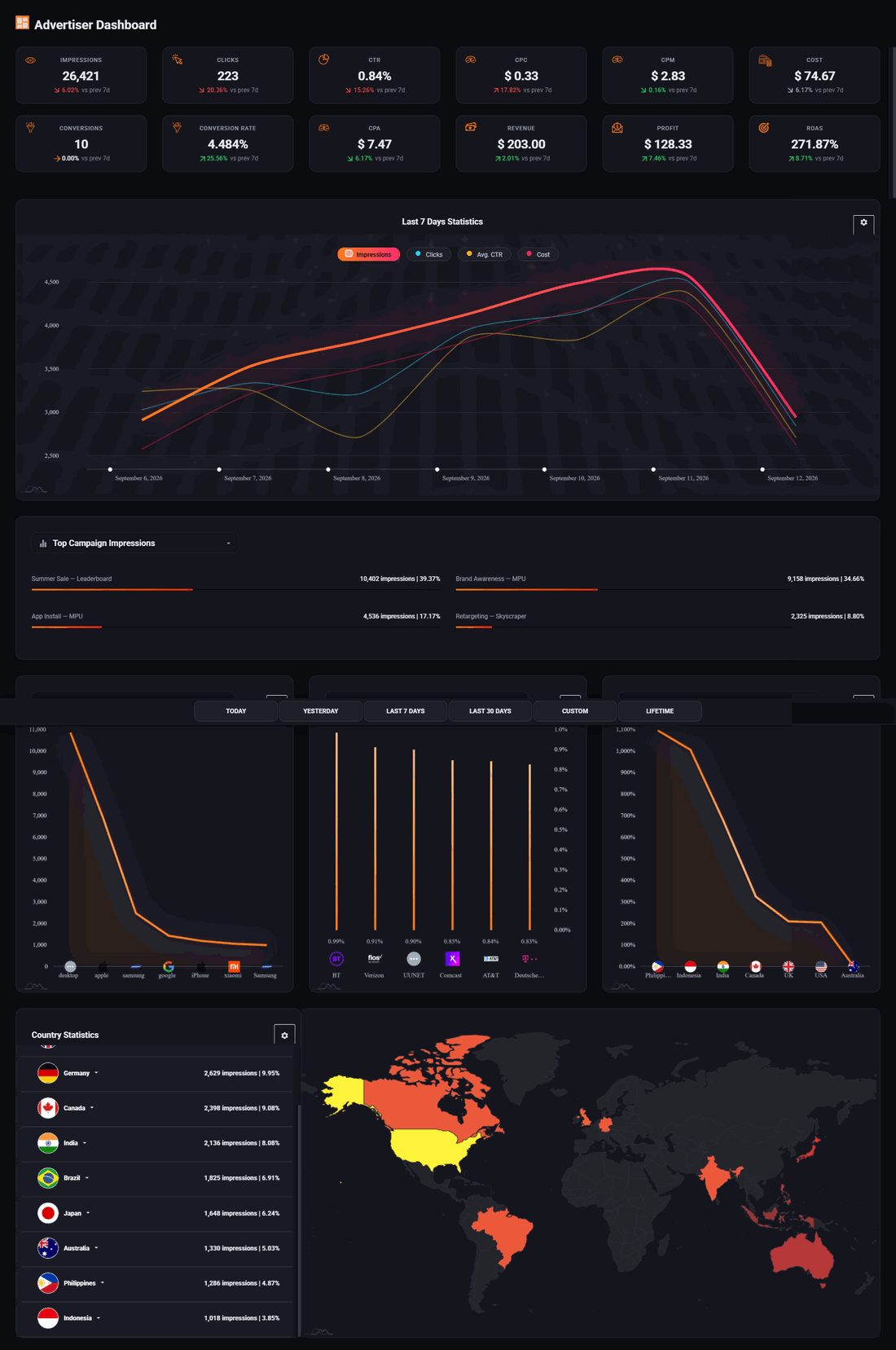
Read only, published credentials, no signup. Every screen is also written out in the help centre.
Your site, your placements, your advertisers.
One price for the whole platform, no capability tiers, and your existing ads still running underneath as the fallback.
Start free trial14 days free. Your existing ads keep running. Cancel anytime.