One platform, not a plugin and a shop
Advanced Ads places ads on WordPress, and its Selling Ads add-on sells ad space as WooCommerce products: days, impressions or clicks, bought at your checkout. Pyrobid is the whole ad sales desk in one place. Businesses sign up on your advertise page, pay you, build their own campaigns and watch them live, on your site and in your newsletter.
The Selling Ads add-on is based on the free e-commerce solution WooCommerce.That is their wording, in the Selling Ads manual, checked 7 October 2026. So selling an ad there means running a shop inside WordPress: WooCommerce, a payment gateway, ad products priced by the day, by impressions or by clicks, and the Tracking add-on for the last two. On Pyrobid the shop is the product, and it is already built.
What Advanced Ads does
Advanced Ads is a WordPress plugin for managing ads. You create ads, from AdSense and Amazon to your own banners, and place them with placements, shortcodes and conditions on content and visitors.
Its Selling Ads add-on comes in the All Access bundle, €89 a year for one site, and turns ad space into WooCommerce products. A business buys at your checkout, gets an email link to upload its ad, and you approve it.
Their manual names the parts left to you: some products need the start and expiry date set by hand when you accept the purchase, and a mobile or desktop price needs its visitor condition set by hand afterwards.
What Pyrobid does
Pyrobid is a hosted ad sales platform under your name. A business signs up on your advertise page, adds funds by card to your own Stripe account or with a voucher, and builds its campaign in five steps, from the ad and the audience to the budget and a bid at or above your floor price. You approve the artwork before anything runs.
Advertisers choose their own audience, from country down to city, device, browser, language and time of day, and watch impressions, clicks and spend live on their own dashboard. Your newsletter sells on the same page.
It works on any site. On WordPress, our free plugin places your slots with a block, a shortcode, a widget or automatic placement.
What a checkout page does not give an advertiser
Selling Ads sells a product. Pyrobid gives the buyer a place to keep buying.
An account, not an order
Advertisers keep a balance with you, build and pause their own campaigns, and come back to run again without emailing you. Every one of them is your customer, on your platform.
They pick their own audience
Country to city, device, browser, operating system, language, day-parting, ISP and keywords, set by the advertiser in their own campaign rather than by you after the sale.
Live numbers on their side
Impressions, clicks, CTR, spend and conversions on their own dashboard, by day and by country. Nothing for you to export and send.
Where Pyrobid fits
Everything Selling Ads needs a shop for, in one place, and the parts a shop does not do.
Your newsletter on the same page
Sponsors book a send, upload their banner and pay. You paste one snippet into Mailchimp, Kit, beehiiv or any email tool, and each send counts its own clicks. How it works.
Any site, not only WordPress
The same slots run on Shopify, Wix, Squarespace or plain HTML. On WordPress, the free Pyrobid plugin places them for you.
Billed on ads that were seen
Advertisers pay for viewable impressions, and bots and crawlers are filtered before anything counts toward a report or a bill.
One price, nothing to assemble
$29.99 a month includes the portal, payments, targeting, reports and newsletter sales. No add-ons to buy, no shop to run and no share of what advertisers pay you.
AdSense stays underneath
Put the ad code you run today in a slot's fallback and it fills the views nobody has booked, apart from one in ten that shows your Advertise Here card by default. You can switch that off.
Your brand on every screen
Your portal and advertise page carry your name, logo and colours, at yourbrand.pyrobid.com, or on your own domain with Pro.
What your advertisers see
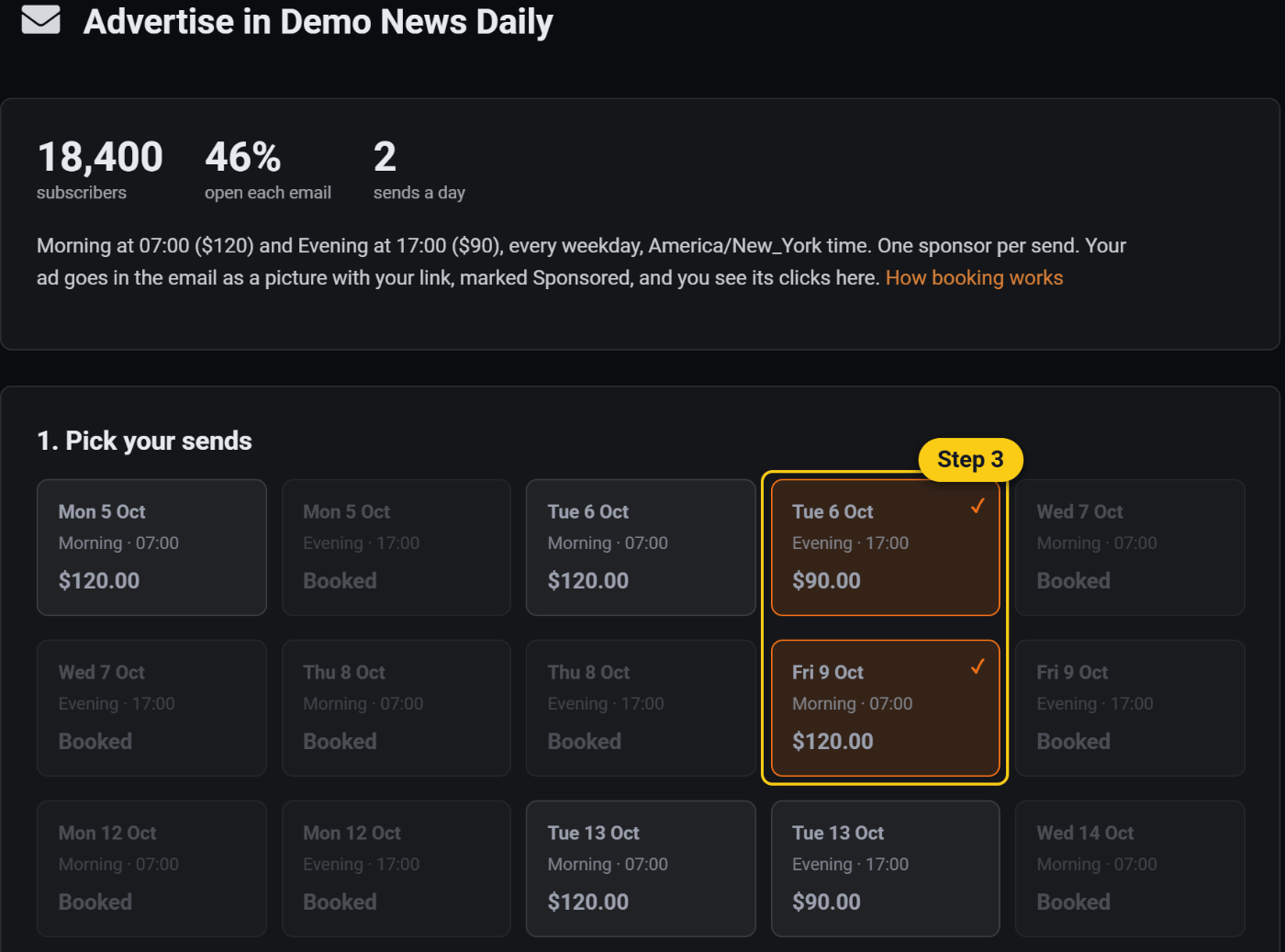
Your brand, on your own domain. They sign up, fund an account and build a campaign in five steps. You approve the artwork before anything runs.
Illustration of step one of the advertiser campaign builder, on your own domain under your branding.
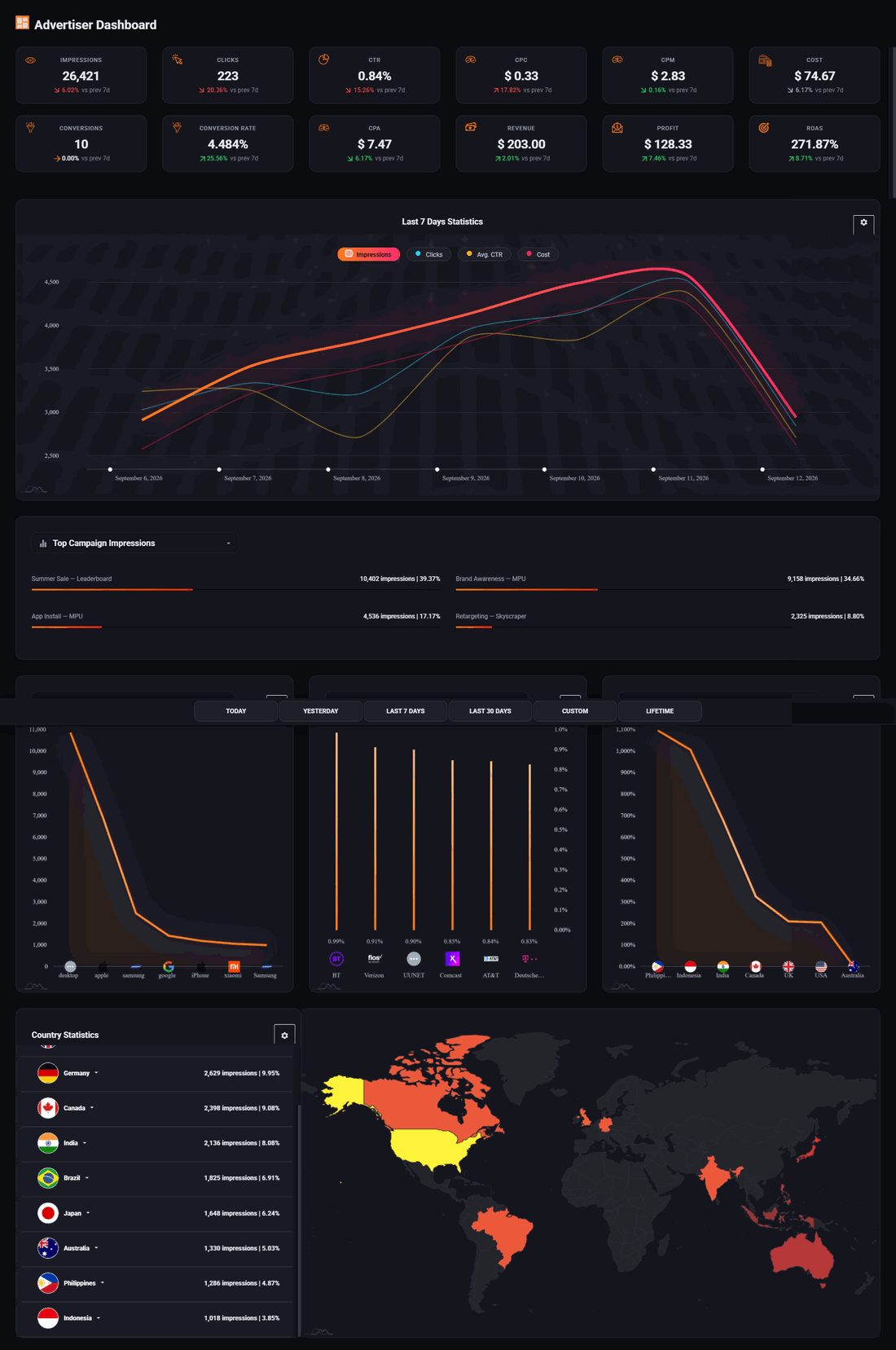
A screenshot is still only a picture. The demo is the running product, read only, with the login published and nothing to install.
Side by side
Advanced Ads details are taken from wpadvancedads.com and its WordPress.org listing, accessed 7 October 2026.
 $29.99/mo
|
Advanced Ads€89/yr with Selling Ads | |
|---|---|---|
| Selling an ad | ||
| What you set up to sell | Nothing: your portal is hosted | Advanced Ads, Selling Ads and WooCommerce |
| How an advertiser buys | Their own account: a balance, campaigns and bids | A WooCommerce product, by day, impressions or clicks |
| Impression and click pricing | Built in | Needs the Tracking add-on |
| Who sets the audience | The advertiser, in their own campaign | You, by hand after the purchase, for a mobile or desktop price |
| Advertiser reports | Live dashboard: impressions, clicks, CTR, spend and conversions | Purchased ads and statistics, with Tracking |
| Where it runs | ||
| Sites | Any site: WordPress, Shopify, Wix, Squarespace or HTML | WordPress |
| Newsletter sponsorships | Sponsors book and pay per send, in any email tool | An ad by shortcode in WordPress email tools such as MailPoet, with no impression count |
| Where advertisers sign in | Your portal, under your brand | The customer account of your WooCommerce shop |
| Placing slots on WordPress | Free plugin: block, shortcode, widget or automatic | The plugin itself |
| The money | ||
| Price | $29.99/mo, everything included | Free plugin; Selling Ads in All Access, €89 a year for one site |
| Taking payment | Card to your own Stripe, or vouchers for anything else | A WooCommerce payment gateway |
The first group is the one to read twice. On Advanced Ads the selling is a shop you set up and run. On Pyrobid it is the product.
Your network keeps what you do not sell
Every ad request runs down a chain. Your direct deals get first refusal at your price. Anything unsold falls through to what you run today.
Choose Pyrobid if
- ›You want businesses to book, pay and run their ads without you in the middle
- ›You sell a newsletter as well as a website, or plan to
- ›Your site is not only on WordPress, or not on WordPress at all
- ›You would rather not run a WooCommerce shop to sell an ad
Common questions
Is Pyrobid a WordPress plugin?
Pyrobid is a hosted ad sales platform with a free WordPress plugin on WordPress.org. The plugin puts your slots on your site with a block, a shortcode, a widget or automatic placement, and links to your advertise page. Your portal, payments and reports run on Pyrobid, so your WordPress only loads the ad script, asynchronously, on pages that show a slot.
Can I keep Advanced Ads?
Yes. Pyrobid does not ask you to remove other plugins or ad code, so Advanced Ads can keep placing what it places today. A Pyrobid slot is ordinary HTML and JavaScript: place it with our plugin, or with any plugin that embeds code. Put the AdSense code you run now in the slot's fallback and it fills the views nobody has booked, apart from one in ten that shows your Advertise Here card by default. You can switch that off.
Advanced Ads costs €89 a year. Why pay monthly?
The €89 buys the add-ons, and the selling still runs through a shop you set up and look after: WooCommerce, a payment gateway, products priced by the day, impression or click, and some conditions set by hand after a sale. $29.99 a month buys the finished desk: advertiser accounts with balances, campaigns they build and target themselves, live reports, newsletter bookings and your brand on all of it, with no share of what advertisers pay you.
Do my advertisers need an account on my WordPress site?
Not with Pyrobid. They sign up on your advertise page, which is your Pyrobid portal, and their account, balance and reports live there. On Selling Ads, the buyer's account is the customer account of your WooCommerce shop.
Where do advertisers come from?
From your site and your field: the advertise link in your menu or footer, the Advertise Here card in slots nobody has booked, and the businesses you already know, who now have somewhere to book. Pyrobid is software you run yourself. It does not supply advertisers or promise what you will earn.
Can I see it before I sign up?
Yes. Install the free plugin and press See your advertise page: it shows the page your site would get, with your site's name and colour, before you sign up for anything. The live demo shows the advertiser side with real data, and after that there are 14 days free.
Sell ads without building a shop.
Fourteen days free, no traffic minimum, and a free WordPress plugin to place your slots. Keep AdSense underneath for the views you have not sold.
Start free trial14 days free. Your existing ads keep running. Cancel anytime.
The plugin's name and what its free version does are from its WordPress.org listing. The prices and what All Access contains are from their pricing page. How Selling Ads works, the WooCommerce and Tracking requirements and the steps left to the site owner are from the Selling Ads page and its manual. All checked 7 October 2026. Pyrobid prices are our own, published at /pricing/.