For site owners
Approve an ad
Nothing runs on your site until you say so. This is where you say so.
No ad runs on your site until you say so. This page explains where the queue is, what to look at before you approve, and what happens after.
Where the queue is
Open Ad Approval from the menu. Every ad an advertiser has submitted is listed here. The filter buttons across the top split them up:
- Pending is your to do list. These are waiting on you and are not running.
- Active are the ones you approved. These can run.
- Declined are the ones you turned down.
- Inactive are approved but switched off by the advertiser, usually because they ran out of money or paused the campaign.
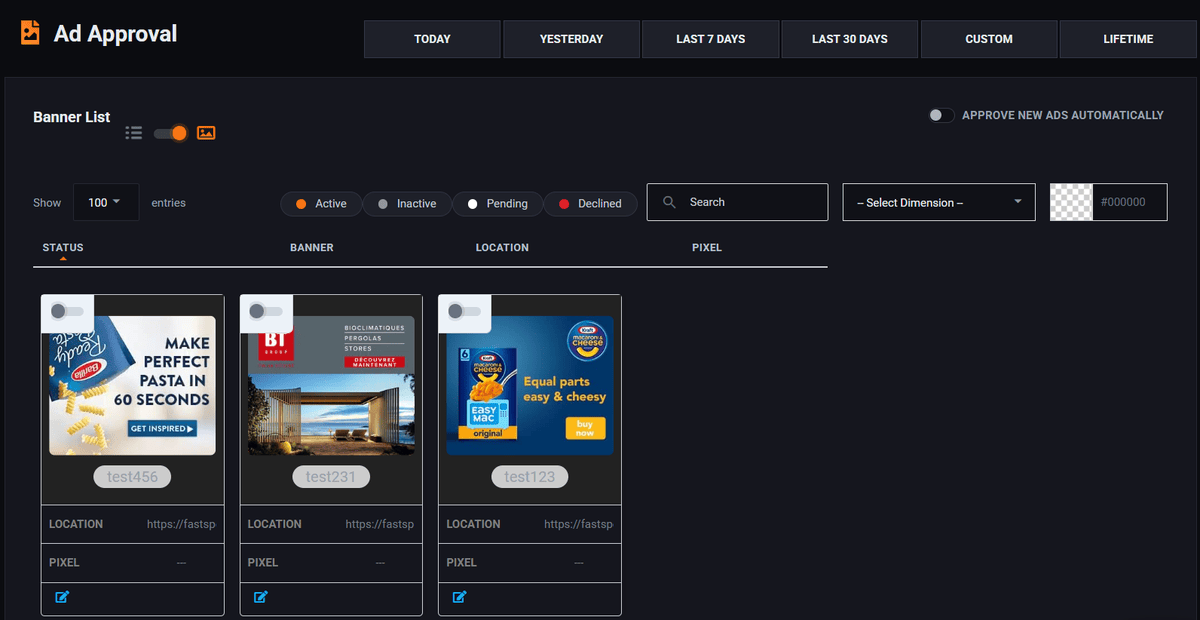
Each one shows the artwork, the name the advertiser gave it, and where clicking it would send a visitor. Click the artwork to see it full size. The card view is easier to judge on; the list is quicker once the queue is long.
What to actually check
You are not judging whether the ad is any good. That is the advertiser's problem and their money. You are checking four things, and it takes about fifteen seconds per ad.
- Follow the link. Open the landing page. Does it match the ad? An ad for running shoes that lands on a crypto signup is the oldest trick there is.
- Look at the artwork. Would you be comfortable with it sitting next to your own writing? That is the whole test. Your name is on the page, not theirs.
- Check it is not pretending to be something else. Fake close buttons, fake system warnings, fake download buttons, anything designed to be clicked by mistake. Decline these every time. They earn you a few cents and cost you readers.
- Check the size is right for where it will run. The system enforces this, but a 300 by 250 with tiny unreadable text in it is still a bad ad.
Write your rules down before you need them. Decide now whether you will take gambling, adult, crypto, political or weight loss ads. Deciding in the moment, with money sitting in front of you, is how networks end up with things on them they regret.
Approving and declining
Open the ad with the Approve / Decline button at the end of its row. The panel that opens shows the creative itself at full size, the size it is booked for, the name the advertiser gave it, and the address a click sends the visitor to. That is everything you need for the four checks above and nothing else: none of it is yours to edit.
At the bottom is a single switch. It opens on Approve, so if the ad is fine you can simply confirm. Flip it to Decline and a reason appears; pick the closest one. The button at the foot of the panel changes to match, so it always says what it is about to do.
Approve and the ad becomes eligible immediately: it can appear on your site within minutes. Decline and it never runs. The reason you picked is saved with it, and the advertiser sees it when they open the ad.
Declining does not take the advertiser's money and does not close their account. They can fix the ad and submit it again, which is usually what happens. If the same advertiser keeps sending you things you have already said no to, that is a conversation, not a moderation problem.
Approving everything automatically
There is a switch on this screen marked Approve new ads automatically. It does exactly what it says: every ad submitted from then on runs without you seeing it first.
It saves real time once you have a handful of advertisers you know. It also removes the only check between a stranger and your homepage. A reasonable middle path is to leave it off while you are small, and turn it on only once the people buying from you are people you have dealt with before.
After an ad is running
Approval is not permanent. Come back to the Active tab whenever you like and take something down. The advertiser stops paying for it at the same moment, so nobody is owed anything.
If a visitor complains about an ad, the Active list is where you find it. The artwork and the destination link are both on the row, so you can identify it from a description quickly.
Run all of this on your own site.
Every screenshot above is the real product. Your advertisers see the same screens under your brand, and on your own domain from the Pro plan.
Start free trial14 days free. Your existing ads keep running. Cancel anytime.