
For site owners
Manage advertiser accounts
The account list, the switch that makes new signups wait for you, and how to turn one off.
Everybody who signs up to buy advertising on your site lands in one list. This page covers what is in it, the switch that decides whether new signups wait for you, and how to turn an account off without losing its history.
Your signup link
On your admin dashboard, near the top, is the address of your advertiser portal with a copy button beside it. Send that link to ad buyers. Anyone who signs up there lands in your panel as an advertiser, ready to make a campaign.
That is the whole sign up process. There is nothing for you to set up per advertiser and no invitation to send.
The account list
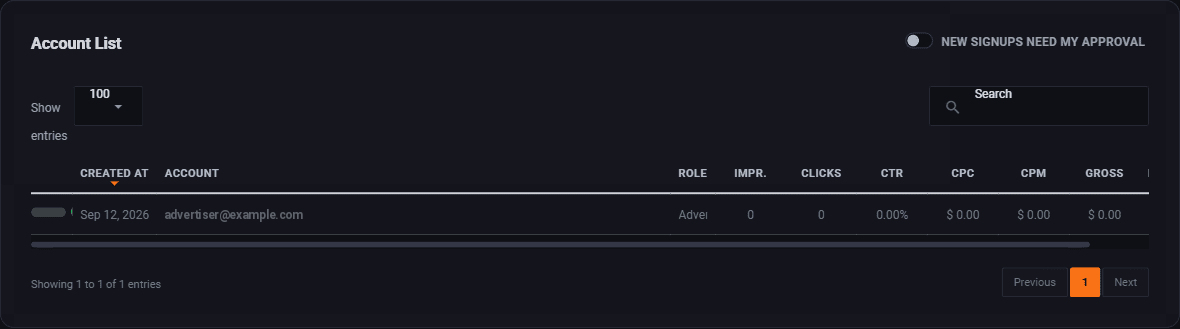

Reading a row from the left:
- The switch. Green is an account that works. Turn it off and they cannot sign in.
- Created at. When they signed up. The list sorts on this by default, newest first, which is usually what you want.
- Account. Their email address, which is also how they sign in.
- Role. Advertiser for almost everybody.
Then the numbers: impressions, clicks, CTR, CPC, CPM and what they have spent. The table carries on past the edge of the screen, so scroll it sideways for the rest.
Those columns are the useful part of this page. They tell you at a glance which advertisers are actually spending, which is who to ring when you want somebody to spend more.
Finding somebody
The Search box at the top right filters the list as you type, and it searches the email address. Show entries changes how many rows fit on a page.
Do new signups need your approval

New signups need my approval decides what happens when a stranger signs up.
Off, which is the default
They get an account straight away. They are signed in the moment they sign up and can start building a campaign. They still cannot put anything on your site, because every ad is reviewed separately before it runs.
They also get an email with a link that confirms their address. Their dashboard reminds them until they click it, with a button to send it again.
This is the right setting for most people. Somebody who has just found your portal at eleven at night can get their ad ready while they are keen, and you look at it in the morning.
On
Nobody gets in until you let them in. They confirm their email address first, then wait in your list until you approve them. Use it if you are running a network where who advertises is genuinely restricted: a trade publication, a members site, anywhere the advertiser list is part of what you are selling.
Turning it on adds a delay to every single signup. Be honest about whether you will check daily. An approval queue nobody empties is a portal that quietly turns people away.
Turning an account off
Use the switch on the row. It stops them signing in and stops their campaigns running.
It does not delete anything. Their campaigns, their banners, their spending history and their balance all stay exactly where they are, and turning the switch back on puts everything back as it was.
That is what you want almost every time. Somebody who stops advertising for a season and comes back next year should not have to start again.
What an account can and cannot do
Worth being clear, because people worry about this:
| An advertiser can | An advertiser cannot |
|---|---|
| Build campaigns and upload banners | Put anything on your site without your approval |
| Add money to their own balance | See any other advertiser, or anything about them |
| See their own reports in full | See what your slots earn, or what anyone else pays |
| Redeem a voucher code you gave them | Change anything about your site or your zones |
Where to go next
- Approve an ad, which is the gate that actually protects your site.
- Take payments, so an account can put money in.
- Get advertisers on board, to fill the list in the first place.
Run all of this on your own site.
Every screenshot above is the real product. Your advertisers see the same screens under your brand, and on your own domain from the Pro plan.
Start free trial14 days free. Your existing ads keep running. Cancel anytime.